.svg)
You can sync your speaking lessons to your personal calendar in just a few clicks.
This helps you:
-
Get instant access to the lesson
-
Avoid double bookings
-
See your lessons alongside your other meetings
🎥 Prefer to see how it works?
Here’s a quick walkthrough showing exactly how to sync your lessons to your calendar.
How to sync your lessons (Step-by-step)
Step 1: Go to your calendar
Go to the 'Learning Hub' on the Swap Language platform and open your 'Calendar'.
If you are logged in, you can click here to go directly to your calendar.
Step 2: Copy the sync link
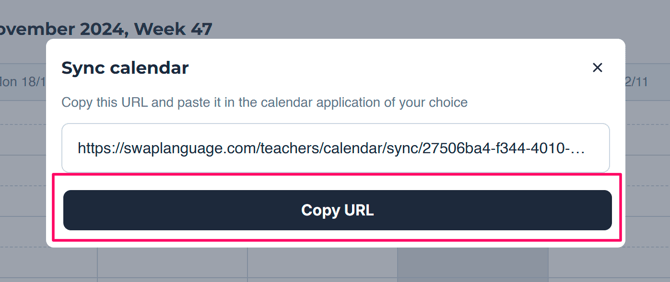
On you 'Calendar' page, you will see a button called 'Sync calendar'. It's right above the calendar. Click here.

Press 'Copy URL', to save it to your clipboard.
Step 3: Choose your calendar
Go to your 'Outlook calendar'.
If you are logged in, you can click here to go directly to your Outlook calendar.
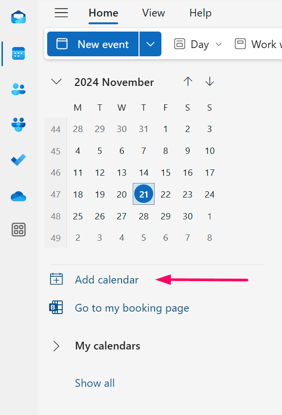
On the left side, below the month overview, you click on 'Add calendar'.
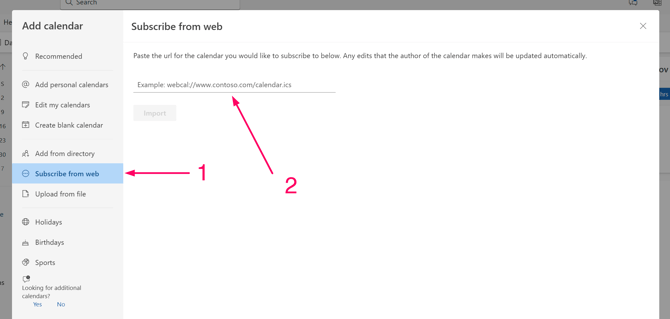
A pop-up window will show up.
Click 'Subscribe from web'.
After that, you paste the link to your Swap Language Calendar, which you copied earlier.
Now, you can add a name to your calendar. An example could be ‘Swap Language Lessons’.
Then you click ‘Import’.
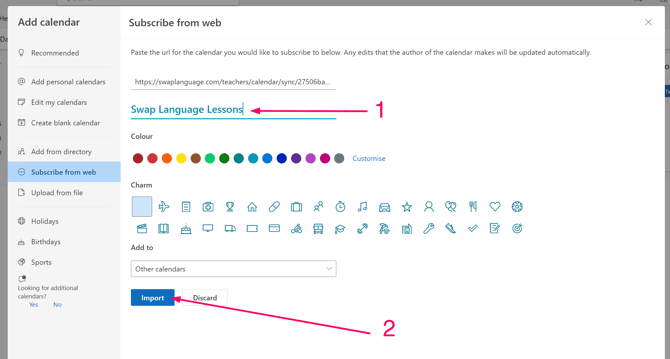
This will import all your Swap Language lessons and it will update itself every day, should you have any reschedules or new lessons.
Step 4: Relax and wait for your next speaking lesson to show up.
Your language lessons are now synced with your Outlook calendar.
Never lose track of your lessons and join them directly from the calendar event.
Enjoy your next lesson!
What to expect
When your lessons are synced:
-
New lessons will appear automatically
-
Changes or reschedules will update
-
You’ll receive reminders through your calendar
If you reschedule a lesson, the update will sync automatically.
Having trouble?
Try these quick checks:
-
Make sure you’re logged into the correct calendar account
-
Refresh your calendar after subscribing
-
If using an .ics file, make sure you fully subscribe (not just download once)
-
Try copying the link again
Still not working? Contact support and we’ll help you.
Access
Calendar sync is available for users with speaking lessons.
If your company is paying for your course, this is included in your plan.
Related guides
-
How to join your speaking lesson
-
How to reschedule a lesson
-
What happens if I miss a lesson?