.svg)
Your video lessons are available directly inside the platform.
You can watch them anytime, and continue from where you last stopped.
🎥 Prefer to see it instead?
Here’s a quick walkthrough showing exactly where to find your lessons and how to start one.
How to find your lessons (Step-by-step)
Step 1: Finding Your Lessons
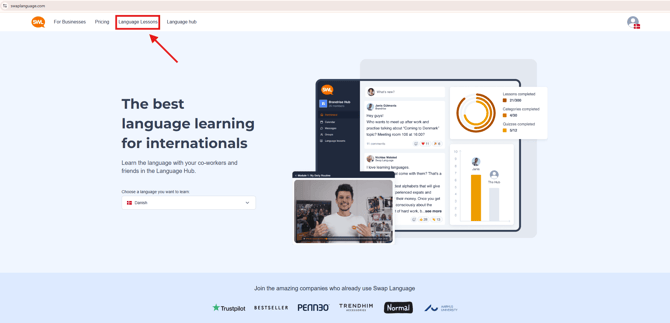
Go to www.swaplanguage.com and click on 'Language Lessons'.
2. Click on a lesson
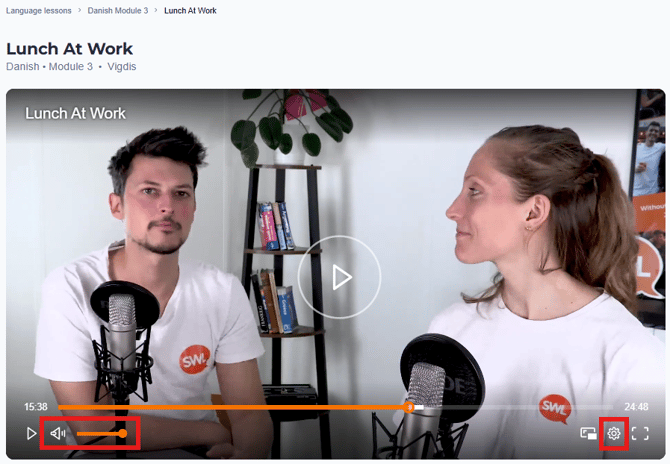
Click the lesson you want to watch and click in the middle of the video player.
You can adjust sound, video quality and speeed in the bottom of the video.
Access
Video lessons are available to all users.
Pro users also have access to:
-
Quizzes
-
AI tools
-
Learning materials
-
Speaking lessons with teachers
If your company is paying for your course, you likely have full access.
Having trouble?
Try these quick checks:
- Refresh the page
- Make sure you’re logged in
- Check your internet connection
- Try a different browser (Chrome, Safari, Edge)
If it still doesn’t work, contact support and we’ll help you.