.svg)
You can join your speaking lesson directly from Swap Language or from your personal calendar if you have synced it.
🎥 Prefer to see it first?
Watch this short walkthrough showing how to join your lesson.
Join from Swap Language
Open Calendar in Swap Language and find your upcoming speaking lesson.
Select the lesson and click Join.
You can join a few minutes before the lesson starts. Your browser may ask for permission to use your camera and microphone. Select Allow so you can take part in the lesson.
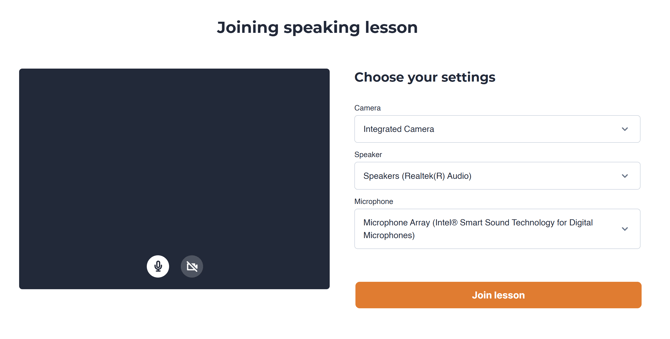
You’ll be placed directly into your lesson room. Your teacher and group will be there.

You can join a few minutes before the lesson starts.
If you arrive early, you may see a waiting screen until the teacher begins.
Having trouble?
If the lesson isn’t loading:
-
Refresh the page
-
Check your internet connection
-
Make sure camera and microphone are allowed
If you still can’t join, see our troubleshooting guide:
→ Having trouble joining your lesson?
Sync your lessons to your calendar
Prefer to see how it works?
Here’s a quick walkthrough showing exactly how to sync your lessons to your calendar.
You can sync your Swap Language speaking lessons to your personal calendar.
Go to Calendar in Swap Language and select Sync calendar.
Copy the calendar link and add it to your preferred calendar as a subscribed calendar.
Once connected, your speaking lessons will appear in your personal calendar and updates will sync automatically.
(Step-by-step) Guide
Step 1: Go to your calendar
If you are logged in, you can click here to go directly to your calendar.
Step 2: Copy the sync link
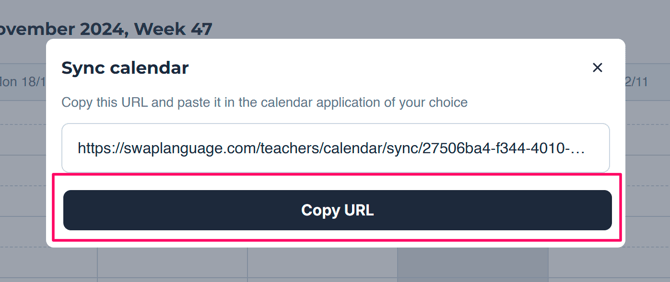
On you 'Calendar' page, you click the 3 dots and click sync calendar.
Press 'Copy URL', to save it to your clipboard.
Step 3: Choose your calendar
Go to your 'Outlook calendar'.
If you are logged in, you can click here to go directly to your Outlook calendar.
On the left side, below the month overview, you click on 'Add calendar'.
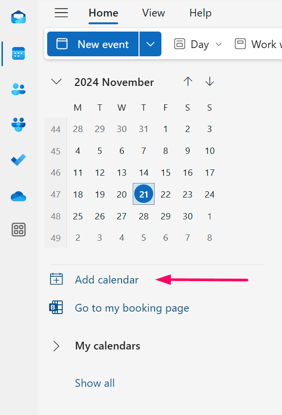
A pop-up window will show up.
Click 'Subscribe from web'.
After that, you paste the link to your Swap Language Calendar, which you copied earlier.
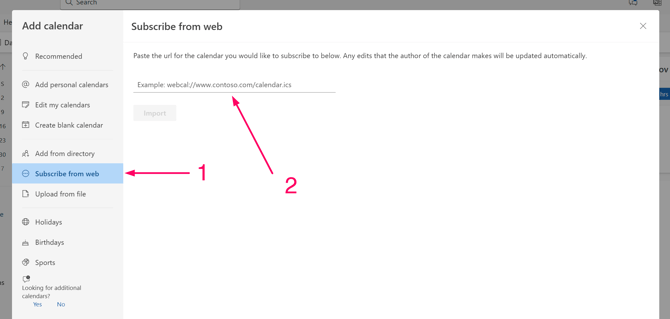
Now, you can add a name to your calendar. An example could be ‘Swap Language Lessons’.
Then you click ‘Import’.
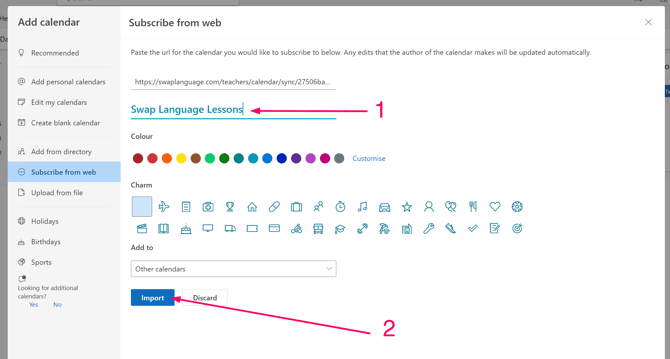
This will import all your Swap Language lessons and it will update itself every day, should you have any reschedules or new lessons.
Step 4: Relax and wait for your next speaking lesson to show up.
Your language lessons are now synced with your Outlook calendar.
Never lose track of your lessons and join them directly from the calendar event.
Enjoy your next lesson!
What to expect
When your lessons are synced:
-
New lessons will appear automatically
-
Changes or reschedules will update
-
You’ll receive reminders through your calendar
If you reschedule a lesson, the update will sync automatically.
Having trouble?
Try these quick checks:
-
Make sure you’re logged into the correct calendar account
-
Refresh your calendar after subscribing
-
If using an .ics file, make sure you fully subscribe (not just download once)
-
Try copying the link again
Still not working? Contact support and we’ll help you.