.svg)
You can switch between available languages directly inside the platform.
Here’s how to change your course language.
🎥 Quick walkthrough
Watch this short video to see how you switch between languages.
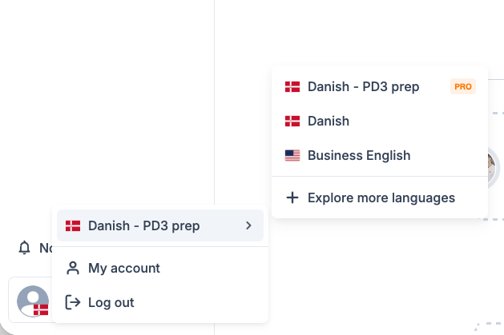
How to switch languages (Step-by-step)
1. Click on the profile circle in the bottom left corner
2. Select a different language
What happens when you switch?
When you change language:
-
Your learning path will update
-
Your progress is tracked separately for each language
-
Your speaking lessons (if included) will match the selected language
If you’re enrolled in a company-paid course, your available languages may depend on your company’s agreement.
If you don’t see the language you need
Some languages may not be available in your account.
If you believe you should have access, contact support and we’ll help.
Related guides
-
How to find your video lessons
-
What is the difference between Free and Pro?
-
How to contact support