.svg)
AI pronunciation practice helps you improve how you sound.
You say a sentence out loud, and the AI gives you feedback on:
-
How close you are to native pronunciation
-
Which vowel sounds you hit correctly
-
Whether your pace feels natural
You can try as many times as you like.
🎥 Prefer to see how it works?
Here’s a quick walkthrough showing how to start pronunciation practice and what the feedback looks like.
It takes about 2 minutes.
How to use it (Step-by-step)
1. Open a video lesson
Go to the lesson you’re currently watching or any other lesson.
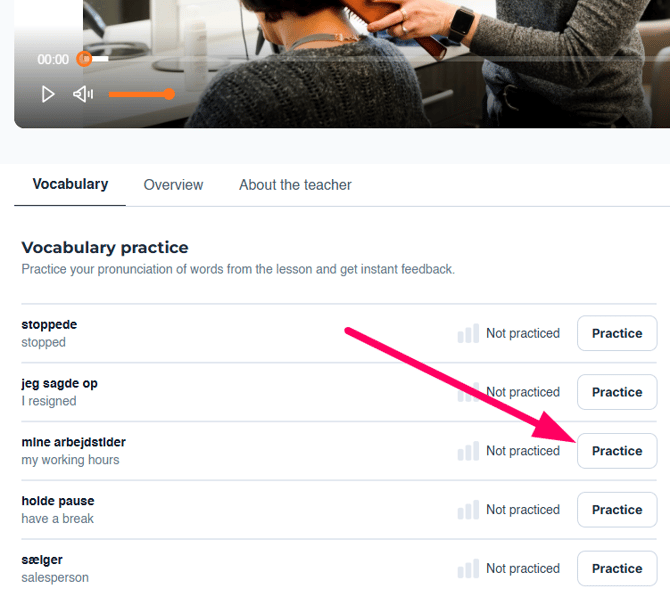
2. Click “Practice”
You’ll find the pronunciation tool below the video lesson
Click 'Practice' to start.
3. Allow microphone access
If it’s your first time, your browser will ask for permission.
Click Allow.
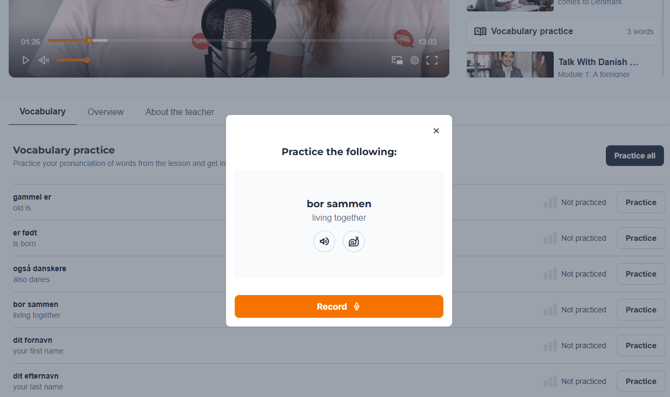
4. Say the sentence out loud
Read the sentence naturally.
Don’t rush. Don’t overthink it.
To help, you click these icons:
🔊 to hear how to pronounce the word.
🐌 to slow down the pace.
5. Review your feedback
You’ll immediately see:
- Your pronunciation score
- Feedback on vowel sounds
- Feedback on pace
You can repeat the sentence right away.
What to expect
The score may change even if you think you said it the same way.
Small changes in mouth shape, vowel length, or speed can make a difference.
It’s not about getting 100%.
It’s about getting more comfortable speaking.
Related guides
-
How to use AI conversations
-
How many AI attempts do I have?
-
How video lessons work