You can use our AI pronunciation tool to practice your speaking abilities and get instant feedback.
Here's a guide to how it works.
Step 1:
Go to 'Language lessons' on the Swap Language platform.
Navigate to the 'Module' and find the 'Lesson' you want to practice.
Enter the 'Lesson'.
Step 2:
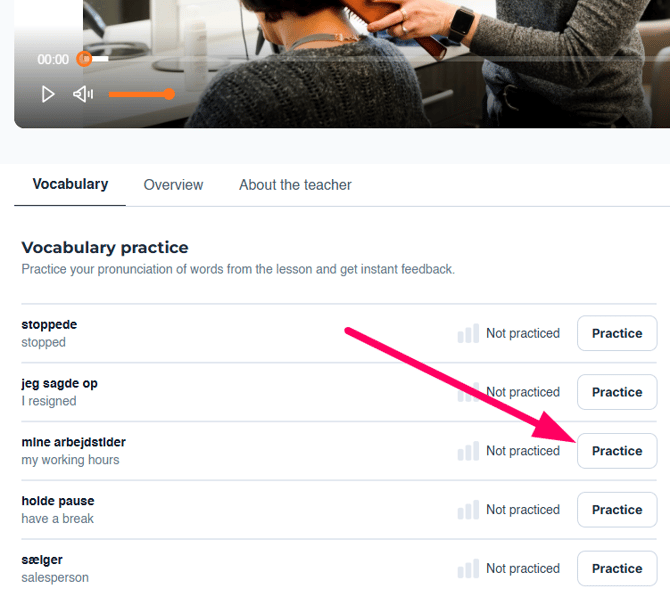
Underneath your lesson, you will find a list of all the relevant words you learned in the lesson you just had.
Press 'Practice' to open up the AI pronunciation tool.
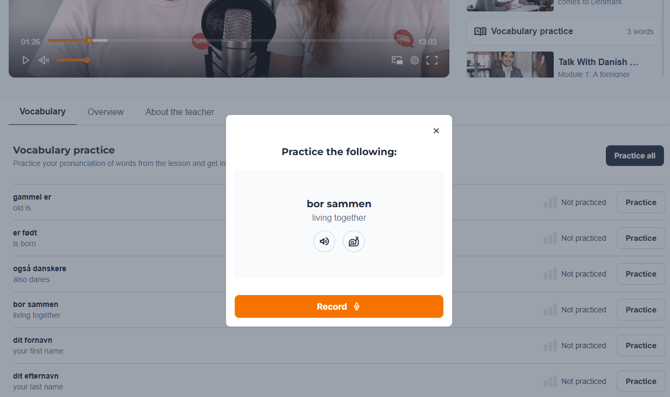
A pop-up will appear, where you can practice the pronunciation of the word or the phrase of the lesson.
Press the 🔊 to hear how the word is pronounced.
Press the 🐌 to slow down the pace.
To practice, click on the 'Record' button, and press it again to finish your recording.
Step 3:
Once you have finished recording, a pop-up will appear.
Here you can see how close your speaking abilities are to native speakers.
Accuracy: How close you are to a native speaker
Fluency: How smooth you speak without pauses
Completeness: How much of the text you are able to say
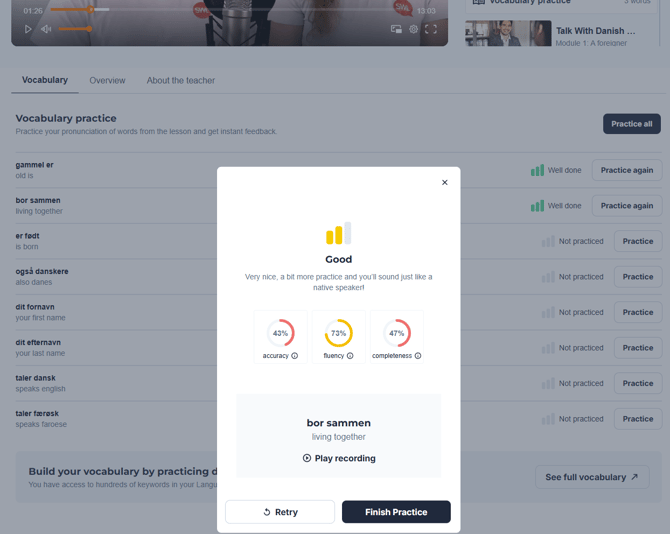
You can press 'Retry' to keep working on your pronunciation, and get a perfect score.
You can press 'Play recording' to listen to where it might go wrong.
When you are happy with your
Here's a screenshot guide on how to enter it.